Booster: A Quality Optimization Framework
Booster is an easy-to-use, lightweight, and extensible quality optimization framework designed specifically for mobile applications. It aims to tackle the performance, stability, and package size challenges that come with growing app complexity.
Why Booster?
Quality optimization is a universal concern for app developers. For apps with tens of millions of DAU, a crash rate of 0.01% still means thousands of affected users. For ride-hailing drivers who stay online for extended periods, the stability of the driver-side app directly impacts their safety and income – not something to take lightly.
As business grew rapidly and complexity increased, we started asking ourselves:
- How can we continuously ensure app quality?
- When the app crashes, how do we quickly identify which business line owns the issue?
- Can we detect potential quality problems before release?
- Can we apply global quality optimizations non-invasively, without pushing every business line to make changes?
These questions led to the creation of Booster. After over a year of refinement, Booster delivered impressive results. Since open-source projects in the quality optimization space based on static analysis are few and far between, and the barrier to entry for quality optimization is relatively high, we decided to open-source Booster – hoping more developers and users can benefit from it.
Features
Dynamic Module Loading
To support diverse optimization needs, Booster implements dynamic module loading, allowing developers to select specific modules without configuration. See: booster-task-all, booster-transform-all.
Third-Party Library Injection
During optimization, Booster may need to inject specific classes or libraries. To manage injected class dependencies, Booster provides a VariantProcessor SPI that makes extension straightforward.
Performance Detection
Jank rate is a key metric for runtime performance. To catch potential jank issues early, Booster uses static analysis to detect performance bottlenecks and generates visual reports to help developers pinpoint problems:
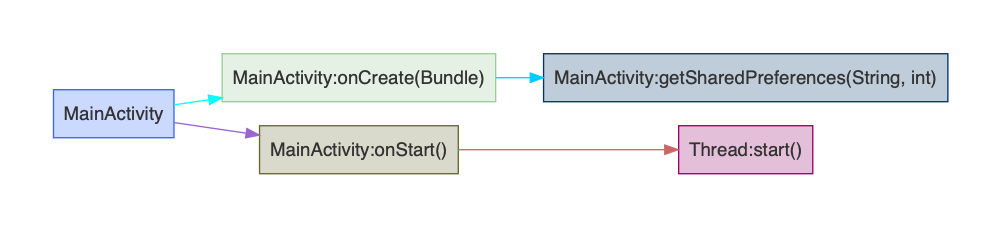
The underlying principle: analyze all class files to build a global Call Graph, identify call chains executing on the main thread (methods related to Application, the four major components, View, Widget, etc.), then output reports grouped by class.
Thread Optimization
Apps with many business lines commonly suffer from thread overload. Thread management has always been a headache – while strict code conventions can help, they’re costly to enforce in large organizations with complex structures, and completely powerless against third-party SDKs. To solve this once and for all, Booster optimizes global thread pools through compile-time bytecode modification and renames threads for better traceability.
Here’s a sample:
1 | class MainActivity : AppCompatActivity() { |
Thread renaming in action:

Resource Index Inlining
Resource index fields serve no purpose after compilation (except for reflection). Booster replaces resource index field access instructions with constant instructions. This improves runtime performance and reduces package size. Resource index (R) classes may seem insignificant, but they actually occupy considerable space. Take DiDi Driver as an example – there were over a thousand resource index classes, and after constant field deletion, the package shrank by about 1MB.
SharedPreferences Optimization
For Android developers, SharedPreferences is everywhere. Modifying SharedPreferences on the main thread causes jank or even ANR. To eliminate this problem entirely, Booster performs global instruction replacement across the app.
Toast Bug Fix
To thoroughly fix bug 30150688 on Android 7.1, Booster globally replaces all Toast.show() method call instructions in the app.
Resource Compression
Package size is a critical metric. Images make up a significant portion of the installation package. Typically, reducing image quality by 10%-20% has no visible impact, so Booster uses lossy compression to reduce image sizes. Smaller images also load faster and consume less memory.
Booster provides two compression options:
- pngquant lossy compression (requires installing the pngquant CLI tool)
- cwebp lossy compression (built-in)
Each has trade-offs: pngquant has no compatibility issues but slightly lower compression ratios than WebP, while WebP has system version compatibility concerns. Overall, lossy compression yields significant results – for DiDi Driver, the package size decreased by about 10MB.
Additionally, libraries like Android Support Library contain numerous image resources supporting multiple screen densities. For an app, keeping only the largest density is sufficient. After deduplication of Android Support Library resources alone, package size dropped by about 1MB.
WebView Preloading
To address jank caused by WebView initialization, Booster injects instructions to preload WebView during main thread idle time.
Beyond these features, Booster also provides development utilities such as checking whether dependencies contain SNAPSHOT versions.
Getting Started
Add the Booster plugin to your buildscript classpath, then apply it:
1 | buildscript { |
Then run the assemble task to build an optimized application package. After the build completes, reports will be generated in the build/reports/ directory.
1 | ./gradlew assembleRelease |
- Blog Link: https://johnsonlee.io/2019/06/04/booster-gradle-plugin.en/
- Copyright Declaration: 著作权归作者所有。商业转载请联系作者获得授权,非商业转载请注明出处。